
Download ConvertAll Portable – unit converter, conversion tool, portable app, measurement tool, free utility, mobile app
Overview
ConvertAll Portable is a lightweight, free utility designed to simplify unit conversion across a broad spectrum of measurement types. With support for over 400 units, this tool addresses the common challenge of converting between disparate measurement systems, making it particularly useful for students, engineers, scientists, and professionals working in technical fields. The app’s primary purpose is to deliver accurate, instant conversions without requiring installation, ensuring seamless access across multiple devices.
Its portable nature allows users to carry the application on a USB drive or cloud storage, enabling use on any Windows system without leaving a trace behind. This makes it ideal for shared or restricted environments where software installation is not permitted. The developer did not provide additional technical details about the team or background, but the app’s focus on functionality and simplicity suggests a targeted development approach.
Real-world use cases include academic research, lab work, DIY projects, and travel planning where metric and imperial units frequently intersect. In the broader app ecosystem, ConvertAll Portable stands out as a niche yet essential tool for users seeking a no-frills, reliable conversion solution that prioritizes portability and ease of access.
Key Features & Functionality
- Extensive Unit Database: The app includes a comprehensive library of over 400 units spanning categories such as length, weight, temperature, time, pressure, energy, and electrical units. This breadth ensures users can handle both everyday and specialized conversions without switching tools.
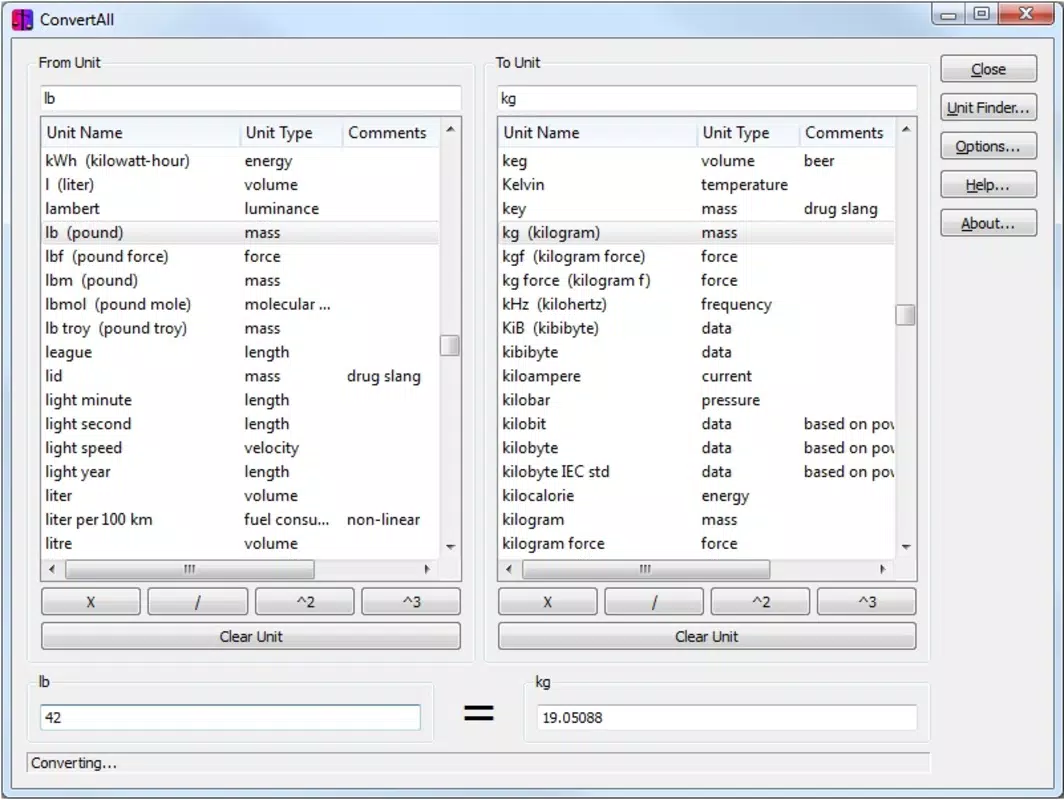
- User-Friendly Interface: The interface is designed for clarity and speed. Users select the source unit and target unit from dropdown menus, enter a value, and receive an immediate result. A status bar alerts users when incompatible units are selected, reducing errors and improving workflow efficiency.
- Custom Unit Addition: Users can expand the database by adding new units, which is especially valuable for niche applications or personal workflows. Newly added units support basic operations like addition, subtraction, and conversion, ensuring they integrate smoothly into the system.
- Search Functionality: An efficient search tool enables quick location of units by name or category. This is particularly helpful when working with less common measurements or when time is a factor.
- Portable Operation: The application runs directly from a USB drive or folder without installation. This feature enhances accessibility and privacy, as no data is stored on the host system after use.
For example, a student preparing for a physics exam can quickly convert joules to electronvolts, while an engineer working on a cross-border project can switch between metric and imperial units seamlessly. The ability to customize the database means users can add units specific to their field, such as astronomical or medical measurements.
Interface, UX & Performance
The user interface of ConvertAll Portable is clean, minimal, and focused on core functionality. The layout centers around two dropdown menus for unit selection, a text input field, and a result display area. Navigation is intuitive, requiring no learning curve for first-time users.
Visual design prioritizes readability, with clear labels and consistent spacing. Although the developer did not list formal performance metrics, the app’s small file size of 2.1 MB suggests optimized resource usage. It is expected to load quickly and operate smoothly on a wide range of Windows devices, including older systems.
Responsiveness is maintained through direct execution without background processes. Stability appears high, as the app operates without requiring installation, minimizing conflicts with system software. The absence of ads or telemetry aligns with a privacy-conscious design philosophy.
While the developer did not specify compatibility with different screen sizes or resolutions, the interface is likely scalable due to its simple layout. Overall, the UX is streamlined for efficiency, making it suitable for both quick tasks and extended use.
Platform Compatibility & Technical Requirements
ConvertAll Portable is designed for the Windows platform. The current version is 1.0.0, and the application file size is 2.1 MB. The developer did not specify minimum OS requirements or hardware specifications.
Compatibility information was not fully disclosed, so users should ensure their system supports running portable applications. No installation is required, which reduces dependency on system permissions. The app is distributed as a standalone executable, meaning it can be launched directly from any accessible drive or folder.
While the app is labeled as portable, its functionality may vary depending on the underlying Windows environment. The developer did not list any additional dependencies or runtime requirements. For users seeking to run the app on non-Windows systems, alternative options would be necessary, as no cross-platform support was indicated.
Pros and Cons
Pros
- Free to download and use with no hidden costs.
- Over 400 units supported across multiple categories.
- Portable design allows use on any Windows device without installation.
- Custom unit addition enhances adaptability for specialized needs.
- Lightweight file size (2.1 MB) ensures fast loading and minimal storage use.
- User-friendly interface with clear navigation and error alerts.
Cons
- Platform is limited to Windows; no support for Android or iOS was mentioned.
- Specific system requirements were not listed.
- No built-in cloud sync or data backup feature for custom units.
- Interface lacks advanced customization options like themes or layout changes.
- Developer did not provide update frequency or support channels.
FAQ
Is ConvertAll Portable safe to download and use?
Yes, the app is free and distributed without malware or ads. Its small size and portable nature reduce security risks, especially when used from trusted sources.
Can I use ConvertAll Portable on my Android or iOS device?
The app is designed for Windows only. There is no official version available for Android or iOS. Users seeking mobile functionality may need to explore alternative tools.
How do I add a new unit to the database?
Users can manually add new units through the app’s built-in customization feature. Once added, the unit can be used in conversions and basic operations.
Does ConvertAll Portable require an internet connection?
No, the app operates offline. All conversion calculations are performed locally, ensuring privacy and functionality in areas with limited connectivity.
How often is ConvertAll Portable updated?
The developer did not specify an update schedule. The current version is 1.0.0, released on 2025-07-15.
Final Thoughts
ConvertAll Portable delivers a focused, reliable solution for users who need a lightweight, portable unit converter on Windows. Its extensive database, ease of use, and ability to add custom units make it a valuable tool for students, professionals, and hobbyists alike. While it lacks mobile support and advanced features, its core functionality is executed with precision.
The app’s free model and minimal footprint enhance its accessibility. For anyone working across measurement systems and needing a no-installation tool, ConvertAll Portable stands out as a practical and efficient choice. Download ConvertAll Portable now.


